
If you’re tired of endlessly hunting for sales and clients on social media and trying to keep up with ever-changing algorithms, I have some good news for you: a Pinterest sales funnel can work for you around the clock, bringing you the traffic and leads you need.
I kid you not—Pinterest is literally my 24/7 sales manager!
And don’t be put off by the word “funnel”—it’s not as complicated as it sounds. In fact, setting up what I call a ‘freedom funnel’ via Pinterest is one of the most effective ways to automate your sales and grow your business without burnout or constant effort.
This incredible platform drives traffic, generates leads, and brings in sales and commissions, all without the constant need to post actively every day or chase fleeting trends and audios.
Disclaimer: This post contains links to products I believe will be useful to the reader, from which I may earn a small commission, at no extra cost to you.
4 Strategies to Make Pinterest Your 24/7 Sales Manager
I’m going to share four Pinterest strategies you can start using today to make Pinterest work for you as your 24/7 sales manager—and not the other way around!
This includes walking you through how to set up a Pinterest sales funnel, aka your freedom funnel, that will take ideal buyers and clients on a journey from casual browser to loyal customer.
If you’re ready to take Pinterest seriously and start seeing results, without constantly hustling on social media, give these strategies a try.
Recommended: Why I Deleted Instagram & How to Build a Brand Without It

1. Keyword Optimisation: Remember, Pinterest is a Search Engine
One of the biggest misconceptions about Pinterest is that it’s just a social media platform. But in reality, Pinterest functions more like a search engine—much like Google or YouTube. So, instead of relying on oversaturated hashtags (which, by the way, Pinterest doesn’t favour—so you can ditch those ASAP), you should be focusing on keywords.
When I talk about keywords, I mean the words or phrases that your target audience is actively searching for. Think about the questions they’re asking or the solutions they’re looking for. These are the key to getting your content seen by the right people and building a solid Pinterest sales funnel.
For example, let’s say you sell digital products that help people get out of debt. Sticking hashtags like #debtfree or #finances onto your pins might seem like a good idea, but in reality, it’s not going to get you noticed. These are generic and oversaturated. Instead, focus on long-tail keywords that speak directly to the problem your audience is facing.
A keyword like ‘How to get out of debt’ or ‘debt-free vision board ideas’ is far more likely to drive targeted traffic to your content. These phrases address real problems that your audience is searching for, and when your content shows up as the solution, they’re much more likely to engage.
This simple SEO tactic can drive evergreen traffic—long-lasting, consistent visits to your website—years after your pins have been published. I’ve had pins that I optimised with the right keywords years ago that are still bringing me views and clicks every single day. It’s an incredible way to maximise the visibility of your content without constantly churning out new posts.
Recommended: Done-For-You Pinterest Set up
2. Automation with Tailwind: Let Pinterest Work for You While You Sleep
One of the reasons Pinterest can feel so effortless for me is because I’ve embraced automation.
Now, if you’re not already using automation tools, this is me reminding you: DO IT! They are an absolute must if you’re trying to build a business that offers you flexibility and freedom. And when it comes to Pinterest, Tailwind can give you both!
Tailwind is an official Pinterest partner; it helps you build out a pinning schedule that combines your own fresh content with repins of other people’s content, giving you the optimal organic pinning schedule.
This means you’re actively engaging on Pinterest every day and consistently sharing fresh content—without you needing to manually pin every day or even be on the platform.
No more babysitting your Pinterest account!
I use Tailwind to schedule months’ worth of pins in just a few hours. I can sit down with a cup of coffee and a good podcast and load up my Tailwind scheduler for the next few months with all my fresh pins and repins, allowing Pinterest and Tailwind to work for me 24/7.
Then, whilst Tailwind is doing all the pinning, I can focus on other areas of my business or even take time off (like holidaying in the Lake District with my hubby, where we just spent 7 days whilst Tailwind pinned 119 pins for me, and Pinterest generated leads, traffic, and yes, even passive sales).
Recommended: How I Schedule 500 Pinterest Pins with Tailwind
Here’s the thing about automation: it doesn’t mean you’re being lazy or disconnected from your business. It means you’re being strategic.
By batching your Pinterest tasks in advance, you free up valuable time to focus on other growth areas. And while you’re off doing other things, Pinterest is still driving traffic, generating leads, and even bringing in sales.
Automation isn’t just convenient; it’s essential for running an efficient, scalable business. If you haven’t yet explored Tailwind, I highly recommend checking it out.
Want to Try Tailwind for Pinterest for Free?
If you’re just starting out or want to test the Tailwind waters, Tailwind’s Forever Free plan gives you a taste of all the essentials. It’s a great way to try out the platform before diving into a paid plan.
👉🏻 Sign up for the Forever Free plan here 👈🏻
3. Evergreen Infographic Pins: The Content That Keeps Giving
One of the biggest differences between Pinterest and other social media platforms is how long your content stays relevant.
Take Instagram, for instance. You spend so much time creating and posting content, but it usually disappears after a day. You might get some initial engagement, but then it’s gone, buried beneath newer posts.
But with Pinterest, your pins live on forever. They continue to be discoverable and can resurface to new audiences months, even years after you first posted them. And if you really want to take advantage of Pinterest’s evergreen nature, you need to be using infographic pins.
Infographics are visually rich and usually offer valuable, easy-to-digest information. They also perform exceptionally well on Pinterest because they offer so much information that a pinner can’t help but want to ‘save it for later’—especially because they often solve specific problems for the audience.
To give you an example, I have an infographic pin from 2021 that is still bringing in over 1,000 impressions every day. This month alone, the pin has already had more than 500 saves and over 1,800 pin clicks. That’s three years after being published!
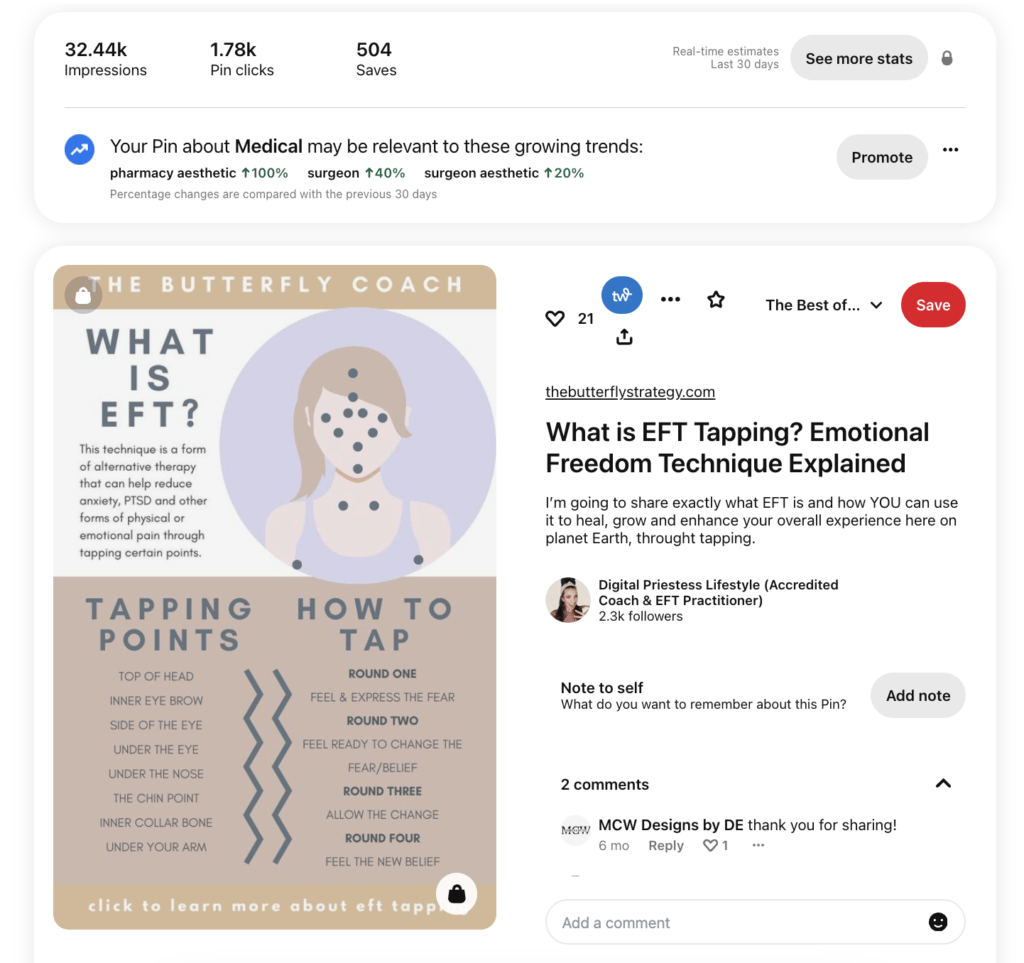
Why does this happen?
These types of pins are designed to offer long-term value. They provide useful, actionable information—whether that’s a step-by-step guide, a list of tips, or a visual representation of a process. Pinterest recognises that they’re valuable to users, so it continues to push them out to new audiences.
Now, here’s the bit people struggle to wrap their head around. Infographic pins don’t usually get as many click-throughs. However, their popularity can significantly boost the visibility of other pins within your account.
When users engage with an infographic—saving it, commenting on it, or sharing it—Pinterest’s algorithm recognises this positive interaction and rewards your account by promoting your other content. It will also push out similar content of yours to the pinner who saved the infographic, even if they don’t follow you (also proving that followers aren’t important on Pinterest—engagement is!).
This will lead to even more impressions, clicks, and ultimately, conversions. So don’t underestimate the power of infographics in your Pinterest strategy.
Want to know exactly how I create my viral infographics?
I’ve put together a mini tutorial that walks you through the process step by step. You’ll learn how to design pins that are not only beautiful but also functional—pins that attract saves, clicks, and traffic long after they’re posted.
4. Setting Up a Freedom Funnel: How Pinterest Sales Funnels Work
Now, one of the most common misunderstandings about how to get sales on Pinterest is the assumption that people will buy directly from a pin. While that can happen, especially if you’re a product-based business using a product pin, however, for digital & service-based businesses, the real power of Pinterest lies in its ability to feed people into your Pinterest sales funnel.
Think of it this way: Pinterest is the starting point of the customer journey, not the end. When someone clicks on your pin, they may be looking for something (usually inspiration, an idea, or a solution), but they’re not usually ready to buy immediately.
However, they might be ready to explore more of what you offer. That’s where your freedom funnel comes in. A freedom funnel is designed to take someone from a free or low-ticket offer and nurture them into purchasing a higher-ticket product.
Here’s what a freedom funnel might look like for different types of businesses:
📌 Service-Based Businesses
Start by offering a free lead magnet, such as a downloadable PDF or guide, that provides value to your audience. Once they’ve opted in, nurture them through email, gradually introducing your mid-tier services, such as a strategy session or membership. From there, guide them towards your high-ticket offer, like a six-month coaching programme.
Example of a Pinterest Sales Funnel for a Coaching Business
- Pin Content: A visually appealing graphic that highlights “5 Simple Steps to Overcome Burnout,” with a call to action for a free downloadable guide.
- Lead Magnet: A free PDF guide titled “Overcome Burnout: A Practical Workbook for Lasting Change”, designed to provide immediate value and solve a small problem for potential clients.
- Email Nurture: After they download the guide, follow up with emails that include success stories, tips for maintaining work-life balance, and an introduction to your low-cost offer, such as a 30-minute strategy session or a paid masterclass on work-life harmony.
- Mid-Tier Offer: As they continue to engage, introduce them to your membership community for ongoing support or a group coaching programme to help them further in their personal development journey.
- High-Tier Offer: The final stage would be offering your premium 6-month coaching programme, designed for deep personal transformation with one-on-one support.
📌 Product-Based Businesses
Begin by offering a free digital product related to your niche to attract potential customers. Once they’ve engaged, upsell them to a complementary physical product. Continue nurturing them with valuable content, exclusive offers, and user-generated content to build trust and further the relationship.
Example of a Pinterest Sales Funnel for a Crystal Business
- Pin Content: A pin showcasing “10 Crystals for Inner Peace,” with a mention of a free downloadable guide.
- Lead Magnet: A free guide titled “Crystal Care 101: How to Cleanse and Energise Your Crystals,” which provides value by educating potential buyers on crystal maintenance.
- Email Nurture: Nurture subscribers by sending educational content on crystal healing, tips for using specific crystals for different purposes (e.g., love, wealth, protection), and sneak peeks of upcoming products.
- Low-Tier Offer: Once trust is established, offer a crystal starter kit or a curated crystal set designed for a specific purpose, such as emotional healing.
- Mid-Tier Offer: Upsell to larger crystal collections or gemstone jewellery, with occasional exclusive offers or a subscription box for crystal enthusiasts.
- High-Tier Offer: The final offer could be a high-end crystal piece, a custom-made collection, or even a personal consultation on crystal selection based on personal energy.
📌 Digital Product Businesses
Start by offering a free or low-ticket digital product, such as an e-book or template bundle, to attract initial interest. After they sign up or make a purchase, upsell them to a more comprehensive digital bundle, eventually leading them through your funnel towards a higher-priced course or membership.
Example of a Pinterest Sales Funnel for Digital Planners
- Pin Content: A visually attractive pin promoting a “Free Daily Planner Template” that helps users organise their day and increase productivity.
- Lead Magnet: A free, beautifully designed daily planner template with sections for tasks, priorities, and affirmations, offering users a tool to plan their day effectively.
- Email Nurture: Once they download the template, nurture them with additional free tips on productivity, organisation hacks, and a discount for your full digital planner bundle.
- Low-Tier Offer: Offer a low-cost digital product, such as a full weekly or monthly planner or a specialised template bundle (e.g., budget planner, fitness planner).
- Mid-Tier Offer: Upsell them to an annual digital planner subscription or a more comprehensive bundle that includes planners for different areas of life, such as work, wellness, and personal growth.
- High-Ticket Offer: The final offer could be a full course or membership where you teach productivity and goal-setting, or an exclusive digital community where members receive new digital products, templates, and resources regularly.
The key is to recognise that the sales don’t always happen on Pinterest – they happen through Pinterest, as part of a larger funnel. Once someone enters your funnel, you have the opportunity to build loyalty, trust, and long-term relationships. And that’s where the real sales are made.

Get Sales on Pinterest: Join the Digital Priestess Collective
If you’re serious about setting up your very own freedom funnel (aka a Pinterest sales funnel) and want to learn how to make sales on Pinterest, then the Digital Priestess Collective is the perfect place to enrol.
Inside the Digital Priestess Collective, my monthly mentorship, you’ll get access to my “Freedom Funnel Bootcamp” programme, where I teach you how to set up a Pinterest sales funnel from start to finish.
You’ll also receive monthly 1:1 support, personalised mentorship, and access to an entire portal of premium programmes with a value of over $10,000.
PLUS, you’ll join a community of like-minded entrepreneurs. It’s the ultimate resource for women looking to scale their businesses through Pinterest and other SEO-friendly platforms.
👉🏻 Learn more about the Digital Priestess Collective here 👈🏻
Whether you’re selling products, building your blog, or promoting services, Pinterest allows you to drive traffic, generate leads, and build long-term visibility for your content—all while working on your own terms.
By using these strategies—keyword optimisation, automation with Tailwind, evergreen infographic pins, and setting up a Pinterest sales funnel—you can transform Pinterest into your own 24/7 sales manager. And if you want guidance on how to get sales on Pinterest directly from me, join the Digital Priestess Collective today!
x Hannah x
P.S. Overwhelmed by the thought of setting up your Pinterest account? I get it—it can feel like a lot to manage on your own. That’s why I offer Done-For-You Pinterest services and Pinterest management services, where I handle everything! Explore my Pinterest packages here 📌
Tags: to create a pinterest, create a pinterest sales funnel, ultimate pinterest sales funnel guide, creating a pinterest sales funnel